Get your fal Direct API key
On this page
Your fal Direct API key lets this app use models in your fal account. Paste your Direct API key into the app. Outlet checks its format on your device. Outlet never receives your Direct API key.
For Direct, choose API scope on fal. ADMIN scope is for a Vault admin key.
Steps
A
Sign in to fal
Open fal.ai/dashboard/keys and sign in. Choose the fal account or team you want this app to use.
B
Create your Direct API key
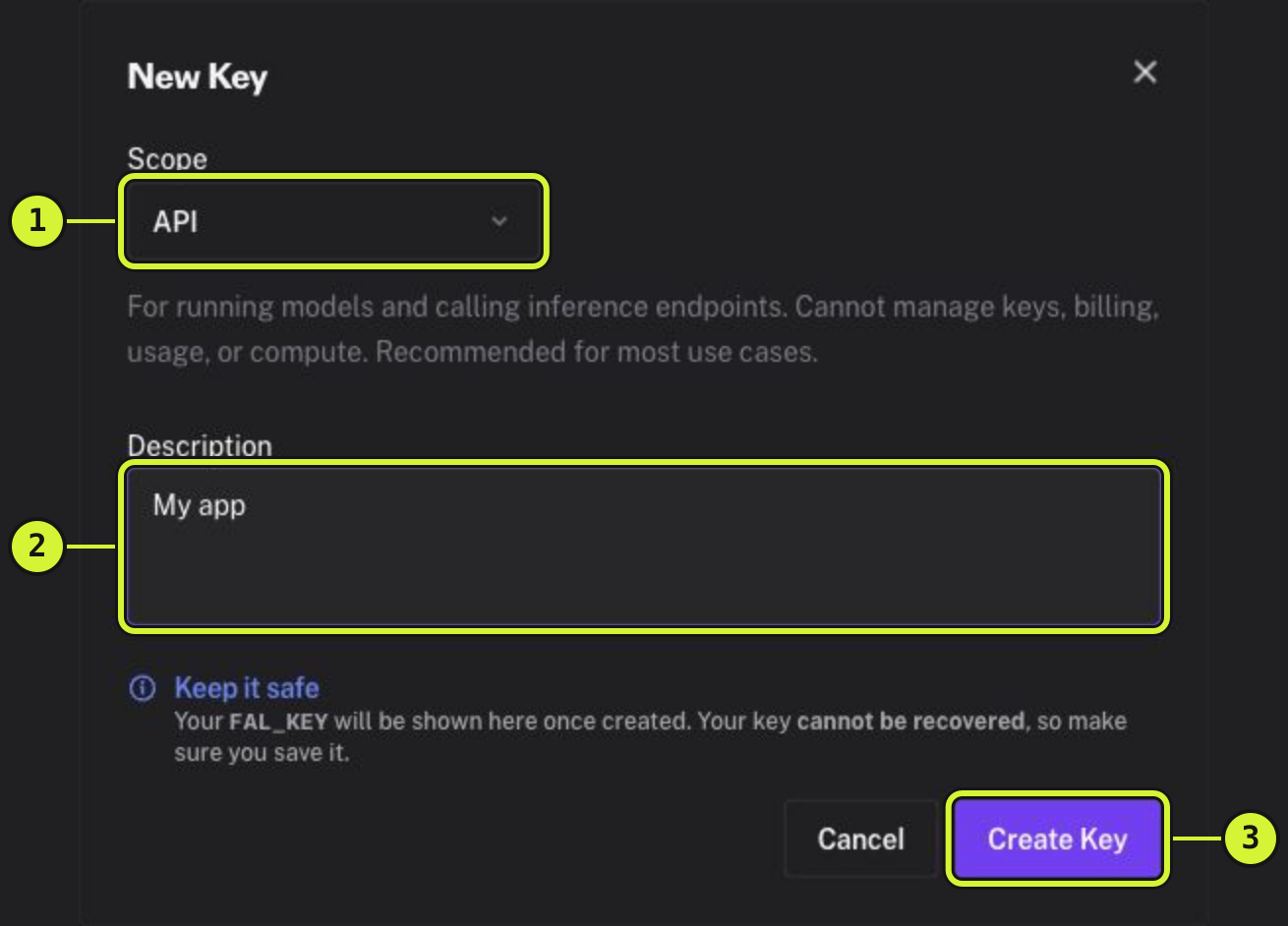
Click Add key. In New Key, set Scope to API. Under Description, name your Direct API key after this app. Click Create Key.
C
Copy your Direct API key
Copy your whole fal Direct API key before closing the result. Include both parts and the colon between them. fal does not show the secret again.
D
Paste your Direct API key into the app
Return to the app. Paste your fal Direct API key into its Direct API key field. Outlet never receives your Direct API key.
A local format check does not confirm your fal Direct API key’s scope or access to a model. Use API scope for Direct. To remove the app’s Direct access, delete its Direct API key on fal.